You are here: Foswiki>Dmi Web>ToolDatabase>ToolHarvester (05 Jan 2010, RichardRogers)Edit Attach
Harvester
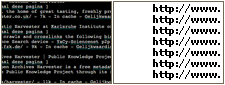
Extract URLs from text, source code or search engine results. Produces a clean list of URLs.
Instructions
Input text in the harvester to extract URLs.
Tip: On a website, view source. Copy and paste source code into harvester in order to extract the URLs (or embedded links).
Tip: To harvest the results of a Google query open it in Firefox, select the results you want to rip the links from, right-click the selection and click 'View Selection Source'. Now paste this into the harvester. To extract only the URLs from the results, choose the setting 'only return uniques' as well as 'Exclude URLs from Google and Youtube '. To extract only the hosts from the results, choose the previous two as well as 'only return hosts'. Note that in its search results Google also includes links to a site's categories etc. If you would only like to extract the links to the specific search results, you can better use the Google Scraper, leaving the top URL box empty.
This tool will only recognize hyperlinks which start with http:// or https:// or www. You might also try the Link Ripper Tool which extracts the hyperlinks (href) from a set of URLs.
Sample project
Project: Extract URLs from the Daily Kos blogroll
- Go to dailykos.com
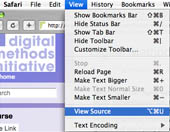
- View page source (in Firefox, choose View>Page Source or press ctrl-u)
- In the page source, find the relevant text under blogroll
- Copy and paste into the Harvester, outputting a list of URLs ready for further analysis, e.g. using the Issuecrawler
Other projects using this tool
Dmi Summer 2011 Spanish RevolutionSpanish Revolution Team Members * Alex, Diana S, Demet, Orsi Research Question Spanish revolution: comparing the mediascape of commercial social media (twitt...
Summer School 2015 Digital Methods App Analysis
Digital Methods for App Analysis: Mapping App Ecologies in the Google Play Store Team Members Anne Helmond, Carolin Gerlitz, Michael Dieter, Stefanie Duguay, Lis...
Summer School 2019 Botsandtheblackmarket
Bots and the black market of social media engagement Team Members Lead: Janna Joceli Omena, Jason Chao Elena Pilipets. Participants: Bence Kollanyi, Bruno Zil...


| I | Attachment | Action | Size | Date | Who | Comment |
|---|---|---|---|---|---|---|
 png png |
tool_harvester.png | manage | 15 K | 05 Dec 2008 - 13:13 | EstherWeltevrede |
Edit | Attach | Print version | History: r7 < r6 < r5 < r4 | Backlinks | View wiki text | Edit wiki text | More topic actions
Topic revision: r7 - 05 Jan 2010, RichardRogers


 Copyright © by the contributing authors. All material on this collaboration platform is the property of the contributing authors.
 Ideas, requests, problems regarding Foswiki? Send feedback